-->
Showing posts with label apk. Show all posts

0 comments


If you are a true movies and TV shows enthusiast, then all you really need is Terrarium TV! Terrarium TV is an Android app which allows you to watch, stream and download FREE and 1080p HD TV Shows and movies on your Android devices. It provides almost any TV shows and movies. Absolutely free. You can download them on your Android device or watch online. Watching movies and TV shows are the best entertainment! 

Features : 
FULL HD (1080p) and HD (720p) sources. 
Absolutely FREE. 
Download and watch offline. 
Multi-language subtitles are available. 
Fast sources (for Full HD and HD, mostly Google Drive). 
Great amount of shows (including reality and documentary). 
Bookmark. 
Last watching. 
Genre selection. 
Chromecast support. 

What's New 
v1.8.6 
New! Added more GoogleVideo links! 
New! Added more Fast CDN links! 
New! Added new providers! 
Fixed existing providers 
Disabled broken providers 
Disabled broken video
Fixed bugs and crashes

DOWNLOAD NOW

Hey Visitor, Your IP is here:)
IP

About The Author


Hi! I am Ajay Kumar Kalva, Currently serving as the CEO of this site, a tech geek by passion, and a chemical process engineer by profession, i'm interested in writing articles regarding technology, hacking and pharma technology.
Follow Me on Twitter AjaySpectator & Computer Innovations

Read More »

0 comments

Live NetTV provides 150+ live TV channels in 7 categories which are: Sports, Entertainment, News, Cooking, Music, Kids and Religious. We try our best to keep links up to date. 

If you are unable to stream a link then make sure your internet is OK and that you are able to play stream other links, then report the link to us and we will fix that as soon as possible. 

We have provided the option to choose from 4 video players to view live streaming in the app. We strongly recommend using MX player for best possible experience. 

Main Features: 
* 150+ live channels 
* Multiple streaming links for channels so that you can enjoy uninterrupted service even if some link goes down 
* 7 categories that provide information and entertainment for all age groups 
* User friendly app with Material Design UI 
* Quick user support. If you want any channel of your choice. Just let us know via in-app channel request option and we will try to add it as soon as possible 

We are a team of enthusiastic students, passionate to provide the best services in the market. Just give us a try and let us know if you have any issues. Even if you don't like our app, at least let us know what we can do to improve. We Listen...Because We Care...We are here to serve you. 

What's New - 
v4.5 | Jun 29, 2017 
New! Live Events Schedule. 
New! Revamped Favourites Tabs. 
New! New Settings to hide countries & categories. 
Added support for more players. 
Full support for Android TV . 
Many new channels added including : Punjabi, Afghani , Nepali & Filipino

Size : 6 mb, No ads


Hey Visitor, Your IP is here:)
IP

About The Author


Hi! I am Ajay Kumar Kalva, Currently serving as the CEO of this site, a tech geek by passion, and a chemical process engineer by profession, i'm interested in writing articles regarding technology, hacking and pharma technology.
Follow Me on Twitter AjaySpectator & Computer Innovations

Read More »

0 comments


This app plays 360 Videos and Virtual Reality Videos - use 360 ° degree, panoramic, 3D mode, VR mode.

- use Touch , use Motion
- use device gyro sensor to navigate in the video
- use Cardboard for Virtual Reality videos
- play and stream videos online
- use as Video player
- play one saved 4K HD Video - Very High Resolution
- share with friends


Note: Be patient VR takes time to load because of your internet connection.


Hey Visitor, Your IP is here:)
IP

About The Author


Hi! I am Ajay Kumar Kalva, Currently serving as the CEO of this site, a tech geek by passion, and a chemical process engineer by profession, i'm interested in writing articles regarding technology, hacking and pharma technology.
Follow Me on Twitter AjaySpectator & Computer Innovations

Read More »

0 comments


Prisma transforms your photos into artworks using the styles of famous artists: Van Gogh, Picasso, Levitan, as well as world famous ornaments and patterns. A unique combination of neural networks and artificial intelligence helps you turn memorable moments into timeless art.

Viral photo app sensation Prisma has just unveiled its beta app for Android users.

It has only been available on iOS for a little over five weeks, yet it̢۪s already the number one app in 40+ countries, and has been downloaded over 7.5 million times, generating 1.5 million daily active users.

Features:
• Modern art filters!
• Stunning photo effects
• Fast sharing
• Prisma Video feature
• 360-degree Prisma images
• A long list of new ‘styles’ for you to transform your favorite photos into eye-popping bits of digital art.

Screenshots:

PrismaSadeemAPK.png


How To Install ?
Download and Install Prisma APK
Done, Enjoy


Hey Visitor, Your IP is here:)
IP

About The Author


Hi! I am Ajay Kumar Kalva, Currently serving as the CEO of this site, a tech geek by passion, and a chemical process engineer by profession, i'm interested in writing articles regarding technology, hacking and pharma technology.
Follow Me on Twitter AjaySpectator & Computer Innovations

Read More »

1 comments


Back to back android posts were being posted by me here, so continuing the flow i'm back with another interesting one today.
Now-a-days android became universal OS, and even available at a price of 3000 bucks, and speaking frankly android become very cheap just because of SAMSUNG, very unsecure, and many celebrities and business professionals avoid using android though its universal.
And now the problem starts here, to increase the customers the smartphone legends such as nokia/microsoft, blackberry of unique platforms just gave a try by launching some models that support android apps, such as nokia X, XL, blackberry 10.2 OS.
upto launching the android supported models is not an big issue, but the blackberry mobiles cant access the playstore, so here comes the question if WE CANT ACCESS THE LARGEST ANDROID APK STORE, THEN HOW CAN WE INSTALL THE APK........??
And here s the solution for your query............!!
  
Android apps are packaged as APK files. You can use any File Manager app to copy these files from the computer to your Android device and then touch the .apk file to install, or sideload, the corresponding app on your device.
There are various reasons why you may want to download the APK installer of an Android app from the Google Play store:
  1. Google Play Store says that a particular app or game is incompatible with your Android device though you know that the app would work just fine.
  2. Sometime an Android app may be not be available for download in the Google Play store of your region or country.
  3. An app is listed on the Google Play store but you want to install that app on another Android device, like the Amazon Kindle tablet, that doesn’t have the Play Store.
android- apk

How to Download APK Files from Google Play Store

Evozi, an Android app developer, offers a one-click online APK download app that lets you download the APK installed of any Android app that’s listed on the Google Play store. The downloader app can be accessed at apps.evozi.com.
To get started, enter the web URL of any app listed on the Google Play store and click the “Generated Download Link” button. The APK download app will fetch the APK file from the Google Play store and will host it on its own servers from where you downlaod the file.
Since the APK files are directly fetched from the Google Play Store, it’s unlikely that the Android App will be infected with any malware. Also, to prevent app piracy, the APK downloader only lets you download free apps and games from the Google Play store, not the paid ones.
author-pic About author
hiiii......, this is ajay, a chemical engineer by profession, a tech geek by passion, enjoys ethical hacking

Read More »

0 comments

Tap Cash
Every Android user downloads apps from Play Store. How will you feel if I say that you can earn some dollars for just downloading apps? No doubt you will feel top of the town. You just need to download some amazing apps and then you can make money easily and redeem it. Isn't it sounds good when you are paid to just download some apps? Everyone wants to earn some extra bucks if the task is simple to do. And you know it very well how easy it is to download apps from play store. Our lives have been smarter with the usage of smartphones and smarter applications in our daily life. Here's an exciting mobile application called "Tap Cash Rewards- Make Money" using it you can earn some money. 

Tap Cash allows you to earn some bucks as you will download and use the applications from it. We use many different types of applications in our daily life. Daily thousand of apps are downloaded from Play Store. Some of them are games, some related to fitness, some of them are services like alarm clock, flash light etc. All of them have become our daily life usage. If we are paid to download these types of apps then there is not any problem.


  What Is Tap Cash?
Tap Cash is an easy-to-use app that will earn you rewards or real cash rewards. You just need to open Tap Cash to download great games/apps/offers and then you can make money easily. If you think that you will be rich or will able to earn huge amount of money then this app is not for you. You will just able to earn some decent amount of money. One can get some extra bucks from this app. Tap Cash Credits can be redeemed for gift and even PayPal cash rewards. 

Tap%2BCash1

How To Earn Through Tap Cash? 
Simply Go to the app store and download the Tap Cash app or click here to download. Now you just need to open the Tap Cash app to download some amazing games such as Temple Run, Cut The Rope, Subway Surfers or some cool apps such as Flipkart, Jabong, Snapdeal, Myntra or any other application available in the Tap Cash to earn real cash or rewards.

What You Will Need?
•    Android powered Smartphone which let you access Play Store. 
•    High speed internet.

Step By Step Guide To Earn Real Cash
Here I am providing a complete step by step process to earn rewards and redeem it as real cash. Once you will get the required target points you can redeem it as gift cards or may use PayPal for some real cash. 

Step 1: Go to Play Store and download Tap Cash on your Android powered Smartphone.

Note:- You will need high speed internet to operate Tap Cash. If it's not opening try to upgrade your internet plan to 3G.  

Step 2: Enter invitation code 3871986 to get 200 Free Credits Instantly!
Step 3: Install Tap Cash after downloading Tap Cash.
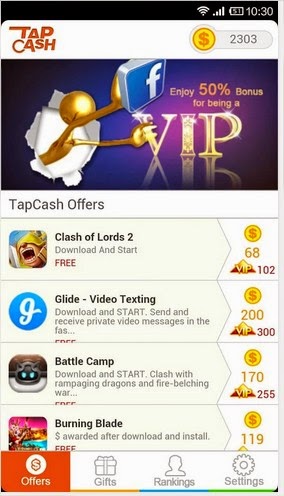
Step 4: Here you will find a complete list of games, applications and offers to earn some points.

Tap%2BCash%2BOffers
Tap Cash Offers

Step 5: To get the cash rewards install and run apps which you would like to download. You can also complete some other offers like watching videos or ads. 

Install%2BAnd%2BRun
Install And Run

Step 6: After installing the apps you can redeem your cash rewards as gift cards or as real cash from PayPal.

Redeem
Redeem

VIP Bonus   
You can enjoy 100% VIP Bonus. To avail Bonus offer just verify your Facebook account through mobile phone and bind it with Tap Cash to get it.

VIP%2BBonus
VIP Bonus

How To Become A VIP?
•    Go to setting.
•    Tap "Bind Facebook Account" to bind Facebook account with Tap Cash.
•    Tap "Become VIP" to verify account through mobile phone.
•    Restart Tap Cash and become a VIP.

Note:- If your Facebook account has been verified through mobile phone, you will become a VIP directly after Binding your Facebook account.
author-pic About author
hiiii......, this is ajay, a chemical engineer by profession, a tech geek by passion, enjoys ethical hacking

Read More »

0 comments

Whenever i'm playing a high fps game in my lappie, it gets strucked and i'll drop to frustration, and many of us have the same situation in case of our mobile, and while gaming on my lappie i'll readyboost my 16gb sony usb to boost my Ram, and for those who were gaming on mobiles this post is special, so lets give a try. 
RAM is a major issue in the low budget Android Smartphones. You will surely get a good quality processor but RAM will be very low as compared to highly priced Android powered devices. Due to low RAM you are not able to use bigger size apps and play heavy games. If one says that I am able to install and run heavy apps and games then I want to clear that those apps will surely crash at the time of running due to shortage of RAM. Everyone can not afford high range phones which supports a RAM of 1-2 GB. To solve this issue today I am going to show you the way toincrease RAM in Android supporting devices. Then you will be able to run and play heavy games without any crashing. 

Note :- By increasing RAM I don't mean to internally add any hardware in your Android device. And no doubt you can't do this also, it's very tough for a common man to increase RAM by adding any hardware. You will need experts who can increase RAM manually and Smartphone manufacturer has some instructions for this which a professional knows very well. Simply follows below mentioned trick which uses some apps to increase your RAM.


What you will Need:
  •  Micro SD card which we will be using as RAM to store things (Use class 4 or higher SD card as it will give good performance to your device rather than any other).
  • Rooted Smartphone or Tablet - You will need to root your device as this feature only works with rooted phones.
  • Micro SD card reader.
  • PC or Laptop anything that you are having.
  • Internet connection to download apps specified below.

Partition Your Micro SD Card:

First of all you will need to partition your SD card and for this just follow the steps mentioned below:
  • Firstly download Mini Tool Partition from Here.
  • Now install it on your PC or Laptop and connect your Micro SD card using card reader.
  • Open Mini Tool Partition in your PC or Laptop and when the application open click on your SD Card and select Delete option. (Note: This will deleted all the data stored on your SD card so if you're having any data then shift it on at any other place.)
  •  It will take some time in formatting when it is done then simply right click on you SD card and select make option. 
  • A new window will open giving you options for making partition; select the partition as primary and file system as FAT if SD Card is less than 4GB or FAT32 if your SD Card is more than 4GB.
  • Now leave about 512 MB or more space for making the next partition.
  • At last just select done and do right click on unallocated space of your SD Card and again click make option. Select Primary partition but change the file system to Ext2, Ext3 or Ext4 etc.
  • Now just click on apply changes and it wait till the partition are made.

Trick to make RAM of Micro SD Card:

Here are the final steps to use your SD card as RAM. Just check out below:
  •  Download and install Link2SD from Google play store on your Android device.
  • Open the app on your Smartphone, It will ask for root permission and after that it will ask you the file system of the .ext partition that you had before made, choose the option as you had choose in the partitioning steps.
  • Just sort the apps and link them, that's it.
So it was simple and easy to understand trick to increase RAM in Android device. Just give it a chance and enjoy.
author-pic About author
hiiii......, this is ajay, working as a chemical engineer, a tech geek, enjoys ethical hacking.
Conatact me here ! Facebook

Read More »

0 comments


“How To Get Free Talktime”, a huge amount of people daily searches for this. And almost 20 to 30 % users find the tricks to get free recharge on their mobile. But after the development of Android platform it’s easy now to get free talktime. There are tons of applications available which allows you to get talktime for free. Using these applications you can complete monthly expenditure of your mobile. These apps can pay you 15-20 Rs per task. These tasks are very simple such as downloading other apps, playing games, completing surveys, referring and inviting friends and viewing ads. I have listed some apps here and steps to get free recharge through them.

Update :- We Have Added One For App To Earn Free Recharge Just Check Out Below.

1. Mcent :-

One of the best Android apps to get free recharge. The reason behind it is that its pay rate is very good. You can get Rs. 12-15 for just simple task of downloading other apps. It updates regularly for new offers to win talktime. You can get your monthly expenditure from this app. There are many referral contests also available in the Mcent through which you can earn thousands of free recharge.  
  •  First step is to register on Mcent. Click Here to Register.
Note :- Register Only From Above Link To Get Free Bonus.
  • Now Download Mcent Android App From Here.
  • Install the Mcent app on your Android Smartphone.
  • Register on Mcent and then Login with your details.
  • Now you will be having some offers. Complete them and you will be get paid.
  •  You just need to download these apps and games available as offers. And then you will get talktime.
Note :- You won't get money if you have installed these apps or games previously.
  • Minumum payout is 10 Rs.
  • You can see your completed offers in the Completed section.
  • Recharge your mobile when you have crossed Rs. 10. 
This is one of the best app to earn free talktime. Application is updated regularly for new offers.
Another great app to earn free talktime through your Android Smartphone. One of the best app for refferal program, if you want to earn money through refferal program then just go for it.
  • Download FreePlus app from Here.
  • Now install app on your Android Smartphone.
  • Open the app and register yourself.
  • Enter r112042 as Refer Code to get Free Bonus.
  • Complete the offers listed to get free talktime.
  • Refer your friends to earn more.
Note :- Download FreePlus app from above link only to get Free Bonus and don't forget to enter Refer Code for some extra money. 

3. Pocket Money (Free Mobile Recharge) :-
It's an another application which gives free mobile recharge. It's the new application but pay rate are very high similar to mcent. Just follow the steps below to install and earn some bonus recharge:
  • Download Pocket Money app from Here.
  • Now install it on your smartphone.
  • Open the app and register your number there.
  • Just complete the offers listed in the app and enjoy. Your money will be credited just after completing the offers.
Ladooo pays you for just checking out Ads and offers. Ladooo supports Airtel, Aircel, Videocon, Virgin Mobile, Vodafone BSNL, Tata Docomo, MTNL, Idea, Loop Mobile, MTS, Reliance, Tata Indicom, Uninor. The thing interesting about this app is that you don't even require registeration. Just complete the offers and get paid.
 
  • Download Ladooo app by clicking Here.
  • Install the app in your Android Smartphone.
  • Complete the offers listed and get paid.
  • Refer friends and earn more. 
  • Don't forget to complete your profile in the menu section to get high value offers.
Note :- Download Ladooo app from only above link to get Free Bonus.
Another ultimate app to get free recharge. Just complete simple tasks like referring friends, downloading games and apps. You can use your balance to recharge your mobile or your friend's mobile easily.
  • Download Earn Talktime app from Here.
  • Open the app and complete offers.
  • Invite your friends to earn more.
These are the top most and most trustable Android apps to earn money. Choose the app which suits you and start earning talktime. Don't go for any app which claims to give you free talktime. First of all read the reviews about the app if they are good then only go for it. 

author-pic About author
hiiii......, this is ajay, working as a chemical engineer, a tech geek, enjoys ethical hacking

Read More »

0 comments


Messaging app Whatsapp has covered almost the entire market. You might have noticed sometime that Whatsapp always remains at the top in the list of app available in the Play Store. If you are a Android user then the chances of not availability of Whatsapp in your smartphones are negligible. Today I am having a trick on how to access Whatsapp without any phone number. One can easily access Whatsapp on his PC or Laptop without having any mobile number. Using this trick all mobile users can access Whatsapp from home through their PC. Now you don't need any valid mobile number to operate Whatsapp. 

Some people don't want to reveal their identity and want to chat secretly. If you are one of those users then you are at right place. This trick can come in handy for you. You can apply this trick on your PC, Laptop (To access Whatsapp on PC or Laptop use Blue-stacks) or any mobile phone. Some people don't want to use Whatsapp on their mobile phone then they can install Android emulator "Blue-stacks" to use Whatsapp on PC.
In order to access WhatsApp you will have to go through phone verification process wherein your number will be verified. This number will be visible to your contacts. But today we are going to bypass the Whatsapp SMS verification process by using a fake mobile number. We will be using a fake number for Whatsapp SMS verification. Follow the step by step guide below to access Whatsapp without phone number:
Bypass whatsapp sms verification:
  • Download and Install WhatsApp on your Mobile Phone or Your PC (Download Blue-Stacks To Access Whatsapp On PC).
  • Download and install Whatsapp on your device.
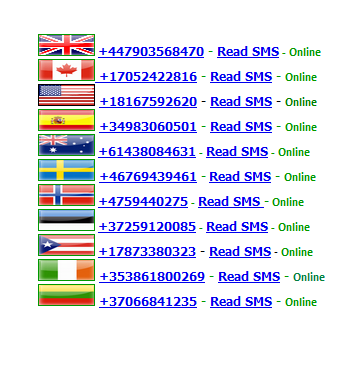
  • Now go to receivefreesms.com and select any of the no. Here I will use an Indian Mobile Number. 
Fake%2BNumbers
Fake Numbers
  • Enter the number in the required field on Whatsapp. It will take you to the sms verification page. 
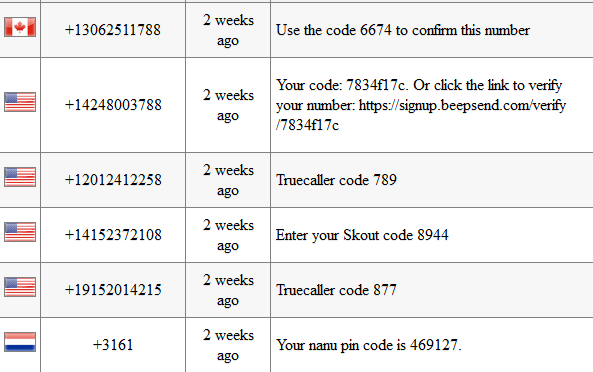
  • Now go back to receivefreesms.com and click on the number which you have chosen to verify Whatsapp sms verification. 
Messages
Messages

  • Enter the verification code in WhatsApp verification page. That's it, you are done.
author-pic About author
hiiii......, this is ajay, a chemical engineer by profession, a tech geek by passion, enjoys ethical hacking

Read More »

0 comments
Recently on whatsapp many rumours were spreaded, that you need to farward the msg stating that whatsapp gonna to be a premium one and if you farward the mesg to 18 or 10 persons you will see the blueticks on the msg you sent to others or else your account will be deleted from servers, and on the other side many relation ship problems have been arised between lovers and friends, so lets put an end to these ugly ones with this quick update. 
Last week Whatsapp rolled out a new update, in which you can see two blue tick marks. These blue marks shows that user has seen your message. However, most of the users were not happy with this update because Whatsapp didn't provide any feature to disable it. Many relationships broke last week, Lol. But after looking the negative response of the users about the update WhatsApp is now introducing a new beta version of the messaging tool includes the option to disable this feature if they want to keep the nagging out of their conversations.

No one expected this Blue Ticks update. But now Whatsapp is trying to fix this update as soon as possible. Because it can ruin many relationships. So, here in this tutorial you can learn how to disable the blue ticks using new beta version.

Whatsapp beta for android lets users disable blue ticks: 
Whatsapp has launched its latest version with the option to disable the Blue Tick Marks. This version is still in its beta mode and available only on Whatsapp's Official website. This beta version is yet made available for Android users. Other platfrom users will have to wait for some time to get the latest update.

Download whatsapp beta version for your android now :
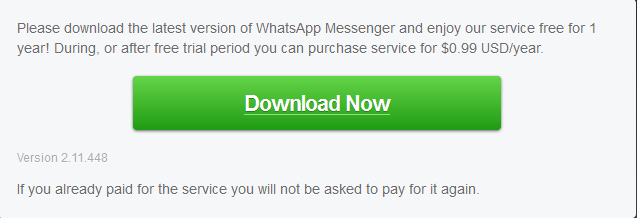
  • First of all download the latest version of Whatsapp (WhatsApp 2.11.448) from Here. This version is not available on Play Store till yet.
Download%2BWhatsapp%2BBeta%2BVersion
Download Latest Whatsapp Beta Version

  • This will download the Whatsapp in .apk format.
  • Now allow "Unknown Source" from setting to install applications in .apk format.
  •  After that install the .apk downloaded file in your Android Smartphones.
  • Then go to Settings > Privacy > and disable the ‘"Read Receipts"
If you are one of those users who is facing relationship problems after the latest update of Whatsapp then use the above method and remove your tension completely. It will take some time to reach this update in play Store till then you will have to download the new APK format to disable Blue Ticks. 
author-pic About author
hiiii......, this is ajay, woking as a technical engineer, a tech geek, enjoys ethical hacking

Read More »

0 comments

One aspect of the Android OS that makes it so popular among users is the number of customization options. It is well-known that the Android system is based on Linux, therefore offering a sea of possibilities in terms of changing about every aspect of its design and also the main features.
Many of us android users would love to see the display to be rounded to match with device design. Most of Android tablet Screen including hottest Nexus 7, galaxy Tab does feature a rounded design but the screen corners are square. The same thing goes to popular Galaxy S series phones including Galaxy S 3 and Galaxy Note ii. If you are fancy to make your Android Screen corner’s rounded than there is an app for that called RoundR.
Tips for Android RoundR makes android screen corners rounded
One main aspect that makes any OS a successful one is the developer interest. Without the apps and tools designed for the platform the user interest drops to none and the system fails to stand out. Fortunately that is not the case with Android, where developers have shown a growing interest for providing top apps.
One of the simplest ways to give your Android device a new look is through the app called RoundR. It is open source and therefore free and available for other developers implementations. What it does is it rounds the corners of your android screen, giving the interface a more appealing aspect. And that without requiring root or any other advanced means of controlling the app. It simply works without bother.
Rounder android app download
RoundR will automatically round the corners of your Android tablet screen or phone screen without any hassle. Just install the app and you are good to go. But if you want than you can also choose a particular corner to be rounded.
Download RoundR for free by hitting the widget below. Also checkout more quick Tips for Android.
RoundR will automatically round the corners of your Android tablet screen or phone screen without any hassle. Just install the app and you are good to go
Android app on Google Play
author-pic About author
hiiii......, this is ajay, woking as a technical engineer, a tech geek, enjoys ethical hacking

Read More »

0 comments

hiii...... dudes after a long gap, i'm back with an interesting topic, Recently one of my friend bought a micromax mobile with android 4.2 installed in it, and t has just 2gb of user available internal memory and all the apps that were being installed gets installed on the phone memory and atlast he got frustrated and i think many of us have the same frustration, luckily i'm using blackbery 10 mobile, i dont have the problem, so if you have the same frustration then come on lets solve it with this tutorial,
 Sounds familiar? This is an inevitable problem faced by most Android users. You can make more space to install your apps by deleting the stock apps that came with the device when you purchased it (most of which will definitely be useless). But in most cases you will have to root your phone to uninstall these ‘bloatwares’ and in the process you will void the warranty of your device. An alternate option is to set the install location of the apps to your SD card. Many people this that this process requires rooting.
The truth is it doesn’t. Here’s how to do this:
Here’s what you will need:
1. An Android device, of course.
2. Android SDK (Download it here). It is quite a big file, so Relax!
3. Windows PC or a Mac.
Steps:
1. Download Android SDK and unzip the contents to a folder.
2. Enable “USB debugging Mode” in your android device. To do this, go to Settings -> Applications -> Development and enable ‘USB debugging’
3. Connect your device to your computer in “charge only” or similar modes but NOT in ‘USB Storage’ mode.
4. Go to the folder where you have unzipped Android SDK and navigate to to ‘sdk’ folder
5a. Windows users: Go to ‘platform-tools folder. Hold down SHIFT key and right-click anywhere in the folder. From the pop-up menu, select ‘Open command window here’. This will open up a command prompt screen.
5b. Mac users: right-click ‘platform-tools and choose [New Terminal At Folder]
6. Now, in the command prompt window, Windows users:
type: adb devices
Mac users:
type: ./adb devices
and press enter. You will see the name of the device connected at the moment.
8. Then windows users type:
adb shell
Mac users type:
./adb shell
and press enter
9. Next, type:
pm setInstallLocation 2
and press enter. (If this command fails, use this: pm set-install-location 2)
Install Apps to SD
10. Done!
11. To verify, type:
pm getInstallLocation
and press enter. If you see an output ” 2 [external] ” means that the process is successful.
Now, in your device, go to settings->Applications->Manage Applications->On SD card (in some devices it may be USB Storage), and check the apps that you would like to move to your SD card.

Also see:

If you are a Samsing Galaxy S Duos and like install games on your SD card, XDA Developers has got a nice post on this.
Also, if you are a Samsung Galaxy 5 user and won’t mind to root your phone, this guide should help you.
If you like to use an app to do this, try AppMgr III (App 2 SD) or Link2SD (Note: Some apps will work only with rooted devices).
author-pic About author
hiiii......, this is ajay, woking as a technical engineer, a tech geek, enjoys ethical hacking

Read More »