-->
Showing posts with label facebook. Show all posts

0 comments

As we know that Facebook doesn't support animated GIF images. If you will upload a GIF image on Facebook then it will not run like a ordinary image in-spite of this it will look like a simple image only. Earlier people found some ways to upload and show GIFs on Facebook but in some days of internal Facebook found the bug and fixed it. So now you are not able to show animated images directly on the Facebook. The only reason behind not showing of GIF images is that it makes Facebook's site slow which decreases it's quality. So in order to maintain site loading time and quality Facebook team doesn't allow direct uploading of animated GIF images.

You might be aware that Google+ loads a little slower than Facebook because it supports direct uploading of GIF images. 

If you're here then don't worry at the end of this article you will be able to post GIFs on Facebookdirectly similar like Google+. After using this trick you can easily post animated images on your wall, your friend's wall or in a group. Just follow the step by step guide mentioned below. Be careful and apply each and every step carefully otherwise you will get an error message.
HOW TO POST GIF ANIMATED IMAGES ON FACEBOOK:
This is an simple to use trick with the use of an third-party website. Follow the steps and apply in order to upload animation on Facebook. 
  • First of all we will need to upload your GIF image on a third-party website so that you can share it easily on Facebook. Simply go to GIPHY website or click here to go. 
  • Now you will have two options either choose your own GIF image or search for existing GIF image on the website. 
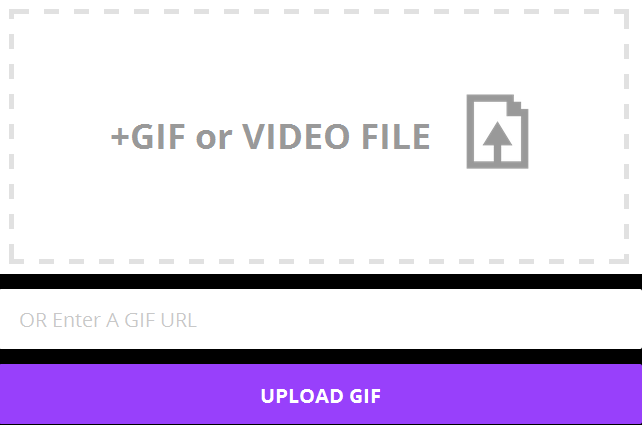
  • If you want to upload then simply click on Upload button at the top right corner and then select your desired image and click on Upload GIF (See in the screenshot below).
Upload-GIF-Image

  • You can also upload a GIF image by pasting its url in the field OR Enter A GIF URL.
  • If you want to choose existing image then search for it on the site and open it.
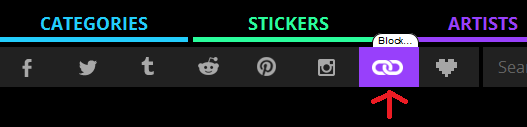
  • Now click on chain icon to copy the URL of the image as shown in the image below.
Click-On-Chain-Icon
  • This will copy the URL of the image.
  • Now just go to your Facebook profile or your friend's profile or in a group. Paste the URL that you copied and post it on the Facebook and that's it. This will upload GIF on Facebook, when your friends will click on it then it will be able to run properly.
So this was all about how to upload or post a GIF or animated image on Facebook. If you have any question, query or another working method then feel free to mention it in the comment section below.
author-pic About author
hiiii......, this is ajay, a chemical engineer by profession, a tech geek by passion, enjoys ethical hacking


Read More »

0 comments

Facebook is the 2nd largest network after world's top company Google. A huge amount of users visits Facebook daily and through them Facebook earns in billions. As Facebook is earning in billions, it offers many ways for you to earn a decent amount. If you want to make money through social media, then Facebook is definitely the place to start. If you want to promote something, sell 
something; then a place full of billions users will be the best choice for you. Even a small business can earn money through Facebook. 
At present almost whole market is dependent on Facebook's advertisment. There is a huge demand of social media marketing. If someone is expert on social media, he/she can easily make money out of it.

You won't become rich through Facebook's earning but it will be a decent amount or you can say it will be an extra income for you. We have found some ways for you so that we can guide you easily the process of earning through Facebook step by step. If you are thinking of marketing through Facebook then just go through the guide.

Thing Will You Need For Marketing !!!
What you basically need to do is that, create a FB fanpage and build with more number of likes and thereby improve the organic reach of your page. Note that, Building high quality page with genuine likes is important and using fake like bots and things like that will be of no use. Using fake methods you will surely have a huge crowd but will be of no use. 

How Many Likes Do I Need To Build ?
According to my personal view you should have a minimum audience
 of 1 Lakh. Then only you will be able to earn a small amount of money. The thing that is important is genuine audience. Your audience must be interested in your page's content; then only they will go through the advertisment offered by you.

How To Build Likes On Facebook Page ?
There are two methods two build your Facebook page's audience.
1. Self Promotion
2. Paid Promotion

Facebook offers you two ways to build audience for your FB page either you can build it on your own or you can pay Facebook to advertie your page. You can share it with your friends and ask them to like your page or you can advertise with Facebook to gain audience at the starting, when you will have a decent amount of crowd then you can start your marketing easily.

When you have a FB page with decent audience you can earn money through some ways listed below:

1. Through Affiliate Advertising :-
Step 1 :- Find An Affiliate Program
Affiliate programs provides you with a unique ID and marketing materials, and then pay you a commission based on the bussiness you generated. There are many websites offer such program like Amazon offers a competitive affiliate program that pays a percentage of any purchase a person will make after clicking through from your post. Apple's itune program has also affiliate program. 

Step 2 :- Join Affiliate Program
Once you have found a good affiliate program, just sign up for it. Add your details in the required fields. 

Note :-  Affiliate program should always be free, dont'e ever pay a single penny to join an affiliate program. 

Step 3 :- Add Accounts 
Make a Facebook account for each affiliate program or group of programs you sign up for. This allows people to follow your pages based on the things they're interested in, rather than having to sign up for one page full of all different kinds of ads. 

Step 4 :- Promote Your Content Offered By Affiliate Program
After getting content or material from affiliate program make post for them daily on your FB page so when user will click on them through your post; you will be able to earn decent amount of money.

2. Through An E-book :- 
Step 1 :- Write An E-book
If you are good at writing then you can write your E-books and sell them through your FB page. Just find out the thing which you are interested and good in writing. The thing you should consider is the people's interest also. Find out the thing in which huge amount of crowd is interested and if you are good in writing about that topic then you will be able to make decent money.

Step 2 :- Secure It 
After writing you can create its PDF and can lock it with password so that when user will purchase it you will be able to give it's password otherwise anyone can read it, you will not be able to make a single penny.

Step 3 :- Make It Available Online 
Make your E-book available online through your FB page and set the price. Try to make some cool offers so that people find it interesting. Find the area related to your E-book and make it available there also.

3. Sell your Facebook Page :-
If you are not interested in any of the above mentioned way then you can simply build audience for your FB page and can sell it easily. You can contact advertisers who looks for some good Facebook page with huge crowd. Remebmer try to build only high quality FB page only with genuine crowd. 

At the time of selling advertisers will look for daily organic reach of your page and the quality of the audience. 

A genuine crowd of 1 lakh will be much much better than a fake crowd of 5 lakh. Remember quality is always prior than quantity.

4. Through Facebook Apps And Games :-  
You can also earn through money by creating games and apps for Facebook. Popular games developing companies like EA, Zynga, Playdom creates games for Facebook and then they monetize these games with ads.

The thing you will need is learn how to develop Facebook games and apps and just submit to Facebook and then you will have two options to earn:
1. You can make it premium if huge amount of crowd is taking interest in it.
2. Or you can monetize easily.
author-pic About author
hiiii......, this is ajay, woking as a chemical engineer by profession, a tech geek by passion, enjoys ethical hacking

Read More »

0 comments
Make nameless Facebook profile

Hello friends, today I am going to share a trick to make nameless Facebook profile name.Today I am share a trick to make a nameless Facebook profile name. Here you don’t need any technical knowledge just follow my simple steps and make nameless Facebook account. Here we will use other proxy server (Indonesian) and some tweaks will make your Facebook profile without name.
Nameless Facebook A/C

Steps to Make nameless or Invisible Facebook Profile name:

1)      First of all open Mozilla Firefox
2)      Click on Tools >> Options >> Advanced >> Settings….
3)      Now click on Manual proxy Configuration >> HTTP Proxy
4)      Paste 119.252.160.34 or 118.98.35.251 in HTTP Proxy
5)      Paste 8080 in Port.
6)      Click OK and OK
7)      Now open your Facebook account >> Account Setting
8)      Scroll down and change the language from English (US) to Bahasa Indonesia
9)      Change your name to RﱞﱞﱞﱞﱞﱞﱞﱞﱞﱞﱞﱞM you need to copy this code from here and paste it.

10)   Now Remove the Letter R and M then enter your password and click to Save.

author-pic About author
hiiii......, this is ajay, woking as a technical engineer, a tech geek, enjoys ethical hacking

Read More »

0 comments
FacebookBlack
Scammers have again targeted more than onebillion active users of the popular social networking giant Facebook, to infect as many victims as possible.
This time, an old Facebook scam is back in action once again!
Malicious Facebook “Color Changer” app has resurfaced again on the popular social networking site Facebook, this time compromising more than 10,000 people worldwide.
The malicious app promises users to change the characteristic blue colour of Facebook’s header and interface to one of nine other colours including pink, purple, green, yellow, orange and black, in order to infect users’ phones and computers with malicious software.

Researchers at China-based Internet company Cheetah Mobile have detected the “Facebook colour changer” that tricks Facebook users into downloading the app via a malicious phishing site.
The phishing website targets users in two ways:
  • First of all, it steals the users’ Facebook Access Tokens by asking them to view a color changer tutorial video,which allows hacker to connect to the victim’s Facebook friends.
  • If the user doesn’t watch the video, the site then tries to get them to download the malicious color changer application, in order to infect their systems with malware.
However, PC users are lead to a bogus site to download a pornographic video player, and Android device users are issued a warning saying their device has been infected and advised to download a suggested application.
According to the researchers at Cheetah Mobile, the problem stems from “a vulnerability that lives in Facebook’s app page itself, allowing hackers to implant viruses and malicious code into Facebook-based applications that directs users to phishing sites.
The new color changer app has affected Facebook users in several countries but this is not the very first time it has happened before, according to Cheetah Mobile’s security researchers.
Facebook has become Number 1 social networking website with more than one billion active users this year. Hundreds of people join the social networking website everyday. On the other hand, with the increase in popularity, Facebook also serves as a great and useful platform for scammers and falling victim to such scams is very simple.
So here’s what you can do in order to protect yourself from this threat. Follow these steps:
  • Realize there’s no way to customize your Facebook with an app
  • Do not click any link which suggests otherwise
  • Even if the link suggests it’s heading toward an Official Facebook Page - DO NOT TRUST IT
But, for those who have already installed the app should uninstall the app straight away and change their Facebook account password. To prevent further problems we suggest you to completely turn offFacebook’s apps platform, and install a trusted security application to your devices.
Remember, there is absolutely no friendly way to change the color of your Facebook. You can only customize your Facebook account or page by adding any of your other profile photo and a different header image through your normal Facebook settings – That’s it!

Read More »