-->
Showing posts with label internet tricks. Show all posts

0 comments

Increase your internet speed by using command prompt. We know maximum computer user's major problem is slow internet access speed, and we are using many software and tricks to speed up our internet connection access speed.
So friends today I’m going to tell you a trick for increasing your internet speed by using command prompt (CMD).

 Check your Internet speed test on http://www.speedtest.net/ before starting this trick. Then again check your new internet speed and see the difference of this Great trick.
How to Speedup Internet connection using Command Prompt.

Follow below given step for increase you internet speed.
For windows user
Click on Start 
Type cmd in Search program and files box (Click right click and Run cmd as Administrator)
Now command prompt will appear
In command prompt go to root directly "C:\" type cd C:\ )
Now type netsh interface tcp set global autotuning=disabled
Now press Enter button you have done it.
cmd trick for increase internet speed

Now please check the internet speed on http://www.speedtest.net/ and see the difference after trick and before trick.


Hey Visitor, Your IP is here:)
IP


author-pic About author
hiiii......, this is ajay , a chemical engineer by profession, a tech geek by passion, enjoys ethical hacking


Read More »

0 comments

Hai Friends, Today i am going to publish an article that listed all working free calling tricks. I am collected many free calling tricks from whole the web and listed it for you. Here i am included free calling tricks for android users that is free calling providing android applications and free calling tricks [methods] for both Pc and mobile users. try all below tricks [methods] and enjoy free calling. hope that you need an article like this.
READ - ANDROID APPS THAT PROVIDE FREE CALLING, ALL FREE CALLING METHODS, WORKING FREE CALLING TRICKS FOR ANDROID USERS, FREE CALLING TRICKS FOR PC

1. Bigo Free calling app for android users
Bigo is an android app that give free minutes every month for users. They are giving 400 credits for each month for all users. Users can increase their credits by refering friends to bigo app. 

download bigo app now and start calling without paying , download bigo now  -click here

2. Dingaling: Free Calling Minutes Providing Android App
Dingaling is an another android application that provide free calling minutes on every month. On every month 1st you will b recharged with free minutes. Dingaling is vry easy to use and you can call even in 2g network. Also, Dingaling provide free sms service too.
Download Dingaling android app free and starting calling your friends free - click here to download

3. Voxox: Free 1$ every month for calling 
Voxox is an another android app that offer 1$ every month to users. Users can use this 1$ for calling all over the world. It is also a simple application. Try voxox and start enjoying international calls for free
Download Voxox and start calling all over the world for free - click here

4. Xone Free calling providing android app
Xone provides 100 free minutes for it's users on every month. It support 17 countries including India. You can enjoy free calling service with Xone.
Download Xone Now and start enjoying free calling - click here

5. Knowlarity : Free online calling service
Knowlarity is an online free calling service. They are giving free 10 minutes for calling world wide as signup bonus. You can use unlimited trick by signup with different email id. Knowlarity is a good online platform for free calling. you must try this site.
CliCK here to go to knowlarity: and start calling world wide free
OLD METHODS:
5.  Call all over india with your own number
By this method you can call any number in india. This method will work on both mobile and computer
Follow the below steps for unlimited free calling trick
·       First go to http://www.incinema.in/free-call-option.php
·       Then click on green button ( free call button )
·       Now you redirect to a page.
·       Enter your number in the first box and enter your friend number ( which number that you want to call)
·       Press call
·       Wait for the button become green
·       You will be connected to the number
·       Enjoy free calling.
Sorry now this Website in updating , so not available now; try later

author-pic About author
hiiii......, this is ajay , a chemical engineer by profession, a tech geek by passion, enjoys ethical hacking

Submit your Email Address to Get Free latest Articles/softwares Directly to your Inbox


Read More »

0 comments

Hello readers, after a long gap i was posting, feeling a lot of pain as this site is being blocked by google for monetizing with some ad networks, anyway i'll be today demonstrating how to download torrent files without using torrent client. 

Hey guys, Today i am gonna show a trick which is very useful those who use Torrent daily. As we all love to download movies ,music , Software from torrent but for some reasons , clients like utorrent ,bittorrent, Vuze & many more unable to give Maximum download speed where as IDM (Internet Download Manager) gives more speed than these torrent clients.
So I am gonna share a Trick by which you can download torrent files from IDM. I would recommend IDM because its the best Download Manager on Internet. 

Note: If the file is 2MB , or 100 MB, or 500 MB or 1 GB m or 8 GB or any size , IDM will download the whole file in one go. There will be no Parts like it is in Rapidshare or hotfile etc. And yes there is Resume Capablity , so that you can pause at anytime.


Steps To Follow:


Step 1: Download & Install IDM (Internet download Manager). If you don't know where to find IDM then PM me , i will you the link.

Step 2: Copy Any torrent link address or download the torrent file.
[Image: AlJK5.jpg]


Step 3: Visit 
THIS site.
[Image: 2zKug.jpg]


Step 4:Paste the Link address or upload the torrent file.

[Image: Q7koT.jpg]
 
After doing this step, Click on Go Free

[Image: m01de.jpg]

What it will do ,you must be thinking!!
As in simple language,the site where you have upload the torrent file will download the whole torrent stuff & will give you the direct link. And if got IDM , then the download will automatically start with IDM with Maxed out Speed. 


author-pic About author
hiiii......, this is ajay , a chemical engineer by profession, a tech geek by passion, enjoys ethical hacking

Submit your Email Address to Get Free latest Articles/softwares Directly to your Inbox


Read More »

0 comments

As we know that Facebook doesn't support animated GIF images. If you will upload a GIF image on Facebook then it will not run like a ordinary image in-spite of this it will look like a simple image only. Earlier people found some ways to upload and show GIFs on Facebook but in some days of internal Facebook found the bug and fixed it. So now you are not able to show animated images directly on the Facebook. The only reason behind not showing of GIF images is that it makes Facebook's site slow which decreases it's quality. So in order to maintain site loading time and quality Facebook team doesn't allow direct uploading of animated GIF images.

You might be aware that Google+ loads a little slower than Facebook because it supports direct uploading of GIF images. 

If you're here then don't worry at the end of this article you will be able to post GIFs on Facebookdirectly similar like Google+. After using this trick you can easily post animated images on your wall, your friend's wall or in a group. Just follow the step by step guide mentioned below. Be careful and apply each and every step carefully otherwise you will get an error message.
HOW TO POST GIF ANIMATED IMAGES ON FACEBOOK:
This is an simple to use trick with the use of an third-party website. Follow the steps and apply in order to upload animation on Facebook. 
  • First of all we will need to upload your GIF image on a third-party website so that you can share it easily on Facebook. Simply go to GIPHY website or click here to go. 
  • Now you will have two options either choose your own GIF image or search for existing GIF image on the website. 
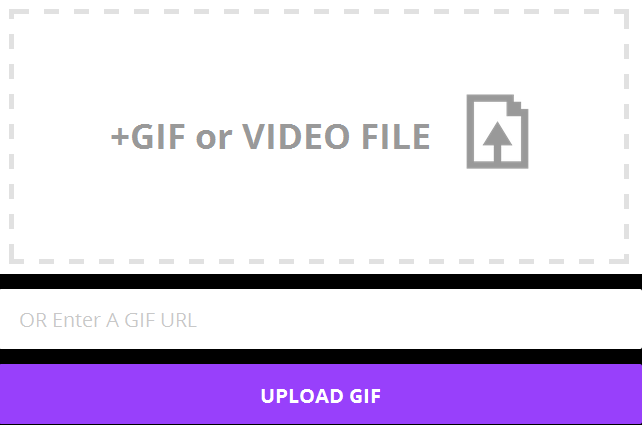
  • If you want to upload then simply click on Upload button at the top right corner and then select your desired image and click on Upload GIF (See in the screenshot below).
Upload-GIF-Image

  • You can also upload a GIF image by pasting its url in the field OR Enter A GIF URL.
  • If you want to choose existing image then search for it on the site and open it.
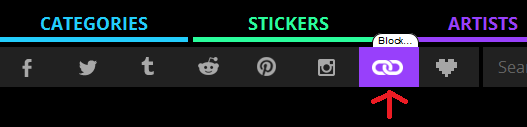
  • Now click on chain icon to copy the URL of the image as shown in the image below.
Click-On-Chain-Icon
  • This will copy the URL of the image.
  • Now just go to your Facebook profile or your friend's profile or in a group. Paste the URL that you copied and post it on the Facebook and that's it. This will upload GIF on Facebook, when your friends will click on it then it will be able to run properly.
So this was all about how to upload or post a GIF or animated image on Facebook. If you have any question, query or another working method then feel free to mention it in the comment section below.
author-pic About author
hiiii......, this is ajay, a chemical engineer by profession, a tech geek by passion, enjoys ethical hacking


Read More »

0 comments

You might not be aware about one thing that you can combine two internet connections to boost internet speed. I know that in some areas internet connection speed is very poor even they are not able to surf properly. But you can increase your internet speed by bonding internet connections easily. There are several methods available to connect your laptop or PC through internet such as broadband, Wi-Fi, Data dongle, Dial-Up connection and even your mobile (by creating hotspot). You can join multiple internet connections to increase your internet speed. 

As you know that you can use only one internet providing service at one time it means that if you are connected through any data dongle then you will not be able to connect through your broadband. As default windows doesn't provide any feature to add two internet connections to boost your internet speed. But don't to worry if you are reading this guide then you will be able to join them. Here we are having a great 100% working tool Connectify Dispatch. It is the best internet load balancer tool available.
WHAT IS CONNECTIFY DISPATCH?

Connectify dispatch is one of the best and easy-to-use software load balancer available in the market. It will optimize your internet connections for fastest internet connectivity. For example say your are having Wi-Fi and 4G, Two Wi-Fi adapters or DSL and 3G? then connectify dispatch will combine any of these to provide you the best internet connection. This software can combine with any of the above mentioned technologies to improve your surfing connection. 

Connectify Dispatch is a boon for those applications that downloads lots of larger files such as BitTorrent. One need high speed internet connection to download files through modern browsers and torrent clients so to solve this problem Connectify Dispatch is made available. 

Connectify Dispatch puts you in control of your internet because Dispatch meters connections so one can avoid costly overages by assigning bandwidth caps to your 3G and 4G cards. Per application settings give you control over which applications can use each internet connection.

Now you might be thinking about internet load balancer. This term might be new for you. So below is answer of it.
WHAT IS SOFTWARE LOAD BALANCER?

Software Load Balancer is an application that takes control of your internet connections. Dispatch puts each of your downloads on the best internet connection. It's easy to use, just connect to two networks, fire up Dispatch, and enjoy faster web browsing right away.

WHAT PEOPLE SAY ABOUT CONNECTIFY DISPATCH:

This is the most popular software to bind two internet connections. Lots of popular brands gave review about it.

LifeHacker
"What if you could merge your home Internet connection with the free Wi-Fi from the coffee shop down the street AND with your phone's 4G connection to create a super-pipe with tons of additional bandwidth? That's what Connectify Dispatch does, perfectly."
Engadget 
"Put all your Internets together into one big internet!"
BitTorrent
"Dispatch is especially useful for [BitTorrent users]"

PLANS AND PRICING:

Connectify dispatch comes with exciting features to offer. It comes in both free and paid version. You can easily use if as free but then you will be able to use only limited features. If you want to unlock all the features then you will need to upgrade it to its Pro version. Connectify Dispatch Pro comes with Hotspot Pro Plus which can turn your laptop or PC into a Wi-Fi hotspot. 

 Lite Version comes with following features:
  • Software Load Balancer
  • Combine Multiple Internet Connections
  • Real Time Bandwidth Monitoring
While PRO version comes with following features:
  • 3 Above mentioned feature.
  • Unlimited Dispatch Uptime
  • Application Specific Settings
  • Connection Metering
  • Interface Selection Methods
  • Automatic Startup
  • No Ads or Banners
  • Premium Support
Hotspot PRO Plus 3x Lifetime ($65)
Hotspot PRO Plus ($55)
Hotspot PRO ($40)

author-pic About author
hiiii......, this is ajay, a chemical engineer by profession, a tech geek by passion, enjoys ethical hacking


Read More »