-->
Showing posts with label whatsapp. Show all posts

0 comments


Whatsapp is the best messaging client currently available. You can now find Whatsapp in almost every smartphone. Since its initiation in 2009 Whatsapp has trumped Facebook and Twitter in the number of messages sent. This in itself speaks volumes of Whatsapp’s success. Coming back to messaging, sometime you have to wish a friend for his birthday or anniversary but are too tired to stay awake till the clock strikes 12. Or like me you always forget to wish the friend. Here’s the fix. You can now schedule Whatsapp messages on your Android phone using one of these apps which you will learn in this simple tutorial. This is a part of the WhatsApp tricks collection we shared some days back.


Whatsapp Message Scheduler Lite

1. Download Whatsapp Message Scheduler Lite from the PlayStore.
2. Open the app and it will ask permission for superuser access
Note: This app works only on a rooted android smartphone.
3. Once permission has been granted it automatically proceeds to the app.
4. It has two icons at the bottom by which you can toggle between the pending and sent messages.
Whatsapp Message Scheduler Lite 1
5. To schedule a new message go to the pending messages and you will find a new message icon.
6. Enter the recipient’s contact number. You will  find all your Whatsapp contacts in the list and can add multiple contacts if needed. Group messages can also be scheduled using this app.
Whatsapp Message Scheduler Lite 2
7. Write the message you wish to deliver.
8. Then fix the date and time for the scheduled message.
You have now scheduled the message. All your scheduled messages can be found in the pending messages.
Whatsapp Message Scheduler Lite 3
Scheduled messages can be deleted here using the edit button. Once the message is delivered you will receive a delivery notification. This is a great app and does its intended tasks efficiently but the app is infested with ads which is very annoying.

Whatsapp Seebye Scheduler

Note: Just like the previous app this too works only on rooted android phones and it requires superuser access. After you grant access you can move on to scheduling messages.
2. The user interface is very clean and simple. Just click on the ‘+’ sign to add new messages.
Whatsapp Seeby Scheduler 1
3. Next you type the title of the message and message itself.
4. As in Message Schedule Lite all the contacts are already synced and you just need to select them.
Whatsapp Seeby Scheduler 1
5. Set the date and time for your message.
Once that’s done the app will return back to the start screen where you will find all the messages scheduled. The messages that have sent successfully will have inactive written on them and active will be shown on the messages not yet delivered.
6. This app provides the added facility of setting frequency for your messages. So if you want to sent a particular message to a person daily or weekly Seebye Scheduler will do the trick.
Even though both apps work quite similarly their small distinct features set them apart. The delivery alert of Message Scheduler Lite comes in handy as you wouldn’t have to open the app to check the delivery status of your message. Whereas the ability to set frequency for the message will cater to the need of specific people. All in all both apps work just fine and are ideal for scheduling messages.

Scheduler for Whatsapp


If you aren’t happy with both of them you can try Scheduler for Whatsapp which is another noteworthy app in message scheduling. With this guide I’m sure next time you will never forget to message your near and dear ones.
About the Author

Hi! I am Ajay Kumar Kalva, Currently serving as the CEO of this site, a tech geek by passion, and a chemical process engineer by profession, i'm interested in writing articles regarding technology, hacking and pharma technology.
Follow Me on Twitter AjaySpectator

Computer Innovations

Read More »

0 comments


Many guys who dont have the luxury of smartphones and have an emotion towards whatsapp search the web "Whatsapp JAR download" or "whatsapp for PC" or something else, and google will give some links and all were fake ones if the searched line is "whatsapp JAR download", because whatsapp with .ja extension is not genuine one, and also  Earlier If we want to use Whatsapp on PC then we need an emulator on which we run our Whatsapp Messenger. So now lets put an end to those unfruitful searches, and get the solution. Now you can use Whatsapp in your web browser directly without any emulator. Use of emulator was a little bit clumsy work which most of users don't prefer to do. So to solve your problem and make your work more easier Whatsapp is available in your web browser straight way. Developers have launched Whatsapp for web browser. It' now officially available on web browser. So java users can also enjoy whatsapp on your default web browser.

This Whatsapp is merely an extension which will use this process "scan QR code listed on the site with your Whatsapp to login on web". It looks really simple and easy-to-use. One can get rid from all the tips & tricks available to use Whatsapp on PC. Because this tutorial is launched officially by Whatsapp which is the most easiest method to use Whatsapp on PC or Laptop. This extension or website will let you access all your data such as chats, images, videos, location etc on your web browser like Google Chrome. but still your data will remain on your Smartphone.

Use whatsapp on web browser:

You can easily use Whatsapp on Google Chrome with this step by step tutorial, simply follow the steps given below to access Whatsapp on your Internet browser.
  • To connect your web browser to Whatsapp client, you will need to go to this URLhttps://web.whatsapp.comWhatsapp has officially made this site or extension available. 
  • Open the above listed URL in your Google Chrome browser. (Currently Whatsapp can be run in Google Chrome browser only. )
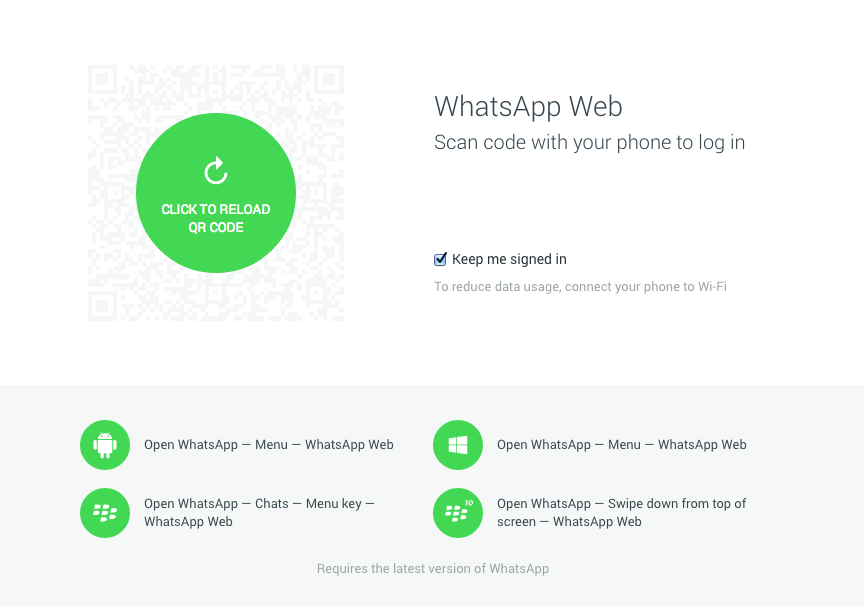
  • Now you will see a QR code there which we need to scan through our Whatsapp.
whatsapp-web-client
  • Open your Whatsapp application on your mobile and go to menu and then there you will see an option to scan this QR code through your Whatsapp. Remember scan this code only through your Whatsapp client. (Don't forget to update your Whatsapp to the latest version otherwise you won't be able to find code scanner option. If after updating also you are not able to see the option, then wait for some time. Whatsapp is trying to made it available for all the users.)
  • When the scan is completed, your Whatsapp will be paired with the Whatsapp web client. 
  • At this situation your phone needs to stay connected to the internet for the proper working of this web client.
  • Currently this web client is not available for iOS users due to some limitations of Apple platform but all other users can use it easily without any problem.
so this was all about Whatsapp web client. Whatsapp rolled out this update after the recent issue that Whatsapp punished some users on using third-party app Whatsapp Plus. Whatsapp blocked users for 24 hours for using this app. They said that they are not authorized with this app in any way. Currently you can use it on Chrome browser only. Support for other browser is coming soon.
author-pic About author
hiiii......, this is ajay, a chemical engineer by profession, a tech geek by passion, enjoys ethical hacking

Read More »

0 comments


Messaging app Whatsapp has covered almost the entire market. You might have noticed sometime that Whatsapp always remains at the top in the list of app available in the Play Store. If you are a Android user then the chances of not availability of Whatsapp in your smartphones are negligible. Today I am having a trick on how to access Whatsapp without any phone number. One can easily access Whatsapp on his PC or Laptop without having any mobile number. Using this trick all mobile users can access Whatsapp from home through their PC. Now you don't need any valid mobile number to operate Whatsapp. 

Some people don't want to reveal their identity and want to chat secretly. If you are one of those users then you are at right place. This trick can come in handy for you. You can apply this trick on your PC, Laptop (To access Whatsapp on PC or Laptop use Blue-stacks) or any mobile phone. Some people don't want to use Whatsapp on their mobile phone then they can install Android emulator "Blue-stacks" to use Whatsapp on PC.
In order to access WhatsApp you will have to go through phone verification process wherein your number will be verified. This number will be visible to your contacts. But today we are going to bypass the Whatsapp SMS verification process by using a fake mobile number. We will be using a fake number for Whatsapp SMS verification. Follow the step by step guide below to access Whatsapp without phone number:
Bypass whatsapp sms verification:
  • Download and Install WhatsApp on your Mobile Phone or Your PC (Download Blue-Stacks To Access Whatsapp On PC).
  • Download and install Whatsapp on your device.
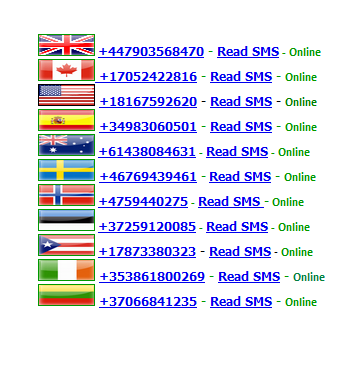
  • Now go to receivefreesms.com and select any of the no. Here I will use an Indian Mobile Number. 
Fake%2BNumbers
Fake Numbers
  • Enter the number in the required field on Whatsapp. It will take you to the sms verification page. 
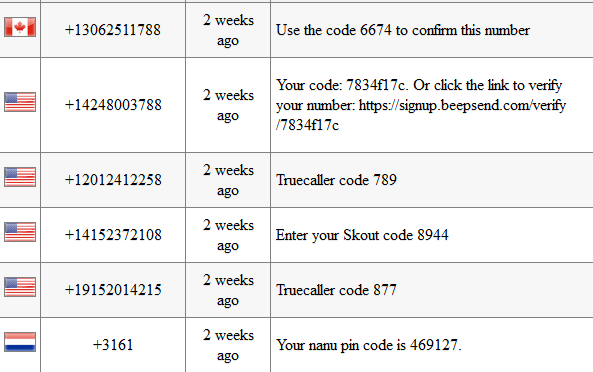
  • Now go back to receivefreesms.com and click on the number which you have chosen to verify Whatsapp sms verification. 
Messages
Messages

  • Enter the verification code in WhatsApp verification page. That's it, you are done.
author-pic About author
hiiii......, this is ajay, a chemical engineer by profession, a tech geek by passion, enjoys ethical hacking

Read More »

0 comments
Recently on whatsapp many rumours were spreaded, that you need to farward the msg stating that whatsapp gonna to be a premium one and if you farward the mesg to 18 or 10 persons you will see the blueticks on the msg you sent to others or else your account will be deleted from servers, and on the other side many relation ship problems have been arised between lovers and friends, so lets put an end to these ugly ones with this quick update. 
Last week Whatsapp rolled out a new update, in which you can see two blue tick marks. These blue marks shows that user has seen your message. However, most of the users were not happy with this update because Whatsapp didn't provide any feature to disable it. Many relationships broke last week, Lol. But after looking the negative response of the users about the update WhatsApp is now introducing a new beta version of the messaging tool includes the option to disable this feature if they want to keep the nagging out of their conversations.

No one expected this Blue Ticks update. But now Whatsapp is trying to fix this update as soon as possible. Because it can ruin many relationships. So, here in this tutorial you can learn how to disable the blue ticks using new beta version.

Whatsapp beta for android lets users disable blue ticks: 
Whatsapp has launched its latest version with the option to disable the Blue Tick Marks. This version is still in its beta mode and available only on Whatsapp's Official website. This beta version is yet made available for Android users. Other platfrom users will have to wait for some time to get the latest update.

Download whatsapp beta version for your android now :
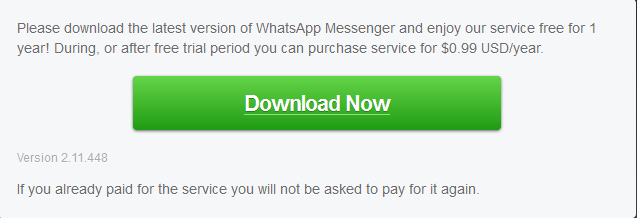
  • First of all download the latest version of Whatsapp (WhatsApp 2.11.448) from Here. This version is not available on Play Store till yet.
Download%2BWhatsapp%2BBeta%2BVersion
Download Latest Whatsapp Beta Version

  • This will download the Whatsapp in .apk format.
  • Now allow "Unknown Source" from setting to install applications in .apk format.
  •  After that install the .apk downloaded file in your Android Smartphones.
  • Then go to Settings > Privacy > and disable the ‘"Read Receipts"
If you are one of those users who is facing relationship problems after the latest update of Whatsapp then use the above method and remove your tension completely. It will take some time to reach this update in play Store till then you will have to download the new APK format to disable Blue Ticks. 
author-pic About author
hiiii......, this is ajay, woking as a technical engineer, a tech geek, enjoys ethical hacking

Read More »

1 comments
whatspp 2416487b How to spy on someone else WhatsApp account from your Android
WhatsApp is now part and parcel of everybody’s life. Whether it’s you or me, no one can spend even few hours without using this amazing instant messaging client. Apart from live chat, mesmerising features like sharing media and other data are key features that allows WhatsApp to hold number of users with it. Although everything is quite handy in WhatsApp, but there’s a small security loop hole that will allow you to access someone else WhatsApp account.
Each WhatsApp account is associated with unique MAC(Media access control) address. If any one changes his/her device(MAC address also changes), they are requested to re-verify their WhatsApp account. Means you cannot access same WhatsApp account from two devices. But what if you got success in having same MAC address for two devices? You can certainly access same WhatsApp ID from two devices that will help you to have a close look on your friends WhatsApp activity. Without wasting any time, lets head over to “How to spy on someone else WhatsApp account from your Android” :
#Spying Softwares: Spymaster Pro
As long as WhatsApp exists, people have always wanted to barge in the privacy and know what goes on in the other person’s WhatsApp account. Call it curiosity or distrust (in the other person), but we all know that WhatsApp is the one sure-shot app that can reveal all the truth. Therefore there has been a strong presence of WhatsApp spying software on the web in the past 1-2 years. But amongst the famous, the dupes, and the fake Spying Software, only few are genuine (read ‘GENUINE’) which offer world class quality and a promise of assured backend support. Spymaster Pro(Product link) is one of the renowned and genuine WhatsApp Spyware, that has been serving its customer with dedication.
#Another trick to spy WhatsApp:
*Before you begin, you need:
# Rooted Android device so that BusyBox can be installed. If you don’t have rooted device, here’s how to install BusyBox on Non-rooted Android.
For starters, busybox allows you to use additional linux commands. BusyBox provides several stripped-down Unix tools in a single executable file.
# Terminal app on your Android to write additional Linux Commands.
# Access to Victims phone for couple of minutes.
*How to spy on someone else WhatsApp :
# First, uninstall WhatsApp from your phone or run multiple WhatsApp account on your Android.
# Now you need to have the victim phone’s MAC address. Different OS have different way of finding MAC address. Here’s how to find victims MAC address :


style="display:inline-block;width:300px;height:250px"
data-ad-client="ca-pub-4278329144565627"
data-ad-slot="7511142419">
For Android -
Head over to settings—> About phone—> Status—> Wi-Fi MAC address.
For iPhone -
Head over to Settings—> General—> About—> Wi-Fi address.
For Windows Phone -
Head over to Settings—> About—> More info—> MAC address.
For BlackBerry –
Head over to options—> Device—> Device and Status info—> WLAN MAC.
# Done with installing terminal app and BusyBox on your Android? If yes, open Terminal app from your Android and follow the instructions for spoofing the MAC address provided in the link. If you followed the steps successfully, you will certainly end up with a spoofed MAC address.
# Now reinstall WhatsApp on your phone, enter victims phone number and verify your account by entering the verification code received on victim’s phone.
# Now you can completely spy on victims WhatsApp ID.Do let us know reaction about spy on someone else WhatsApp account.
author-pic About author
hiiii......, this is ajay, woking as a technical engineer, a tech geek, enjoys ethical hacking

Read More »

3 comments


After lot of Researching I came upon with 3 Whatsapp Hacks which Really Works, and in this article i will also clear some misconception on WhatsApp Hacking.
Let’s Get Started 

1. WhatsApp Sniffer

WhatsAppSniffer is a tool for root terminals to read WhatsApp conversations of a WIFI network (Open, WEP, WPA/WPA2). It captures the conversations, pictures / videos and coordinates that aresent or received by an Android phone, iPhone or Nokia on the same WIFI network. It has not been tested with W indows Phone terminals. It can’t read the messages written or received by the BlackBerry’s, as they use their own servers and not WhatsApp’s.
This application is designed to demonstrate that the security of WhatsApp’s communications is null. WhatsAppSniffer just use the TCPDump program which reads all the WIFI network packets and filters those which has origin or destination WhatsApp’s servers. All messages are in plain text, so it does not decrypt anything, complying fully with the legal terms of WhatsApp (3.C: “While we do not disallow the use of sniffers Such as Ethereal, tcpdump or HttpWatch in general, Any we do going efforts to disallow reverse-engineer our system, our protocols, or explore outside the boundaries of the ordinary requests made by clients WhatsApp …. “)
For WPA/WPA2 encrypted networks, if uses the tool ARPSpoof (optional).

 Requirements

  1. A Rooted Android Device.
  2. Your Victim Should Use Same Wi-Fi Through Which you are connected.
  3. WhatsAppSniffer Donate ★ root v1.03.

2. Decrypting Conversations

have your victim locked his whatsapp? or you want all his conversation on your PC. Generally for security reasons WhatsApp encrypt Conversation while taking backup in SD Card or Phone Memory.But i have found a tool on XDA that claims to decrypt all the whatsapp conversation down to your PC.
If you have some access over his device you can also send files from Bluetooth to your device and later read all the conversations.
This tool is called WhatsApp Xtract and for this all credits goes to ztedd
Some general advice on how to backup Whatsapp and get the database file:

Android

- In Whatsapp go to settings – more – Backup Chats
- Copy the folder “Whatsapp” on the SD card to your backup location (e.g., PC)
- (ideally also) use the app Titanium Backup to backup the full whatsapp application together with its data, copy the backup from the folder “TitaniumBackup” on the SD card to your backup location (e.g., PC)
- Use this tool Whatsapp Backup Extractor (download in this thread) to show the chats in a friendly readable format. The necessary files “wa.db” and “msgstore.db” you will find inside the Titanium Backup archive “com.whatsapp-[Date]-[some digits].tar.gz”, alternatively (without Titanium Backup) you can use the msgstore.db.crypt file from the folder Whatsapp/Databases on the SD card.

iPhone

- use Itunes to create an unencrypted Backup
- use an Iphone Backup Tool to get the file net.whatsapp.WhatsApp/Documents/ChatStorage.sqlite, e.g. I-Twin or Iphone Backup Extractor. Make sure to create an unencrypted backup with Itunes, as these tools can’t handle encrypted backups. Another possibility are forensic tools like UFED Physical Analyzer.)

Blackberry

- sync your blackberry with desktop manager and then copy the messagestore.db file from SD
- however, it seems that this file is encrypted? Currently we don’t know how to get the unencrypted messagestore.db file
- Blackberry not supported yet!

Nokia

 - not known yet
- Nokia not supported yet!

3. Using Spywares

Using 3rd Party Spywares can be very useful for spying not only WhatsApp Conversation but also many things like, you can able to Track GPS Location, you can capture the lock screen passwords and they can be also used for monitoring Websites. there are many spywares in the market but i recommend is BOSSPY. Because it’s free :)

Some Misconceptions about WhatsApp hacking

after writing Hacking facebook accounts I have received a E-Mail Most of them were asking for help for hacking their partner’s WhatsApp and I have replied them all. but lots of people were having misconceptions about whatsapp hacking so let me discuss over here.
  1. Hacking WhatsApp is Much Harder than Hacking Facebook and Twitter as Facebook and Twitter can be Hacked using Social Engeenering Techniques like Phising and many others when we compare to hack someones WhatsApp Account and Gain Full Access over his Account – It is nearly Impossible.
  2. There is no tool that can hack whatsapp and give you a full access over someone’s whatsapp account. Yes, there are Lot’s of Youtube Video’s ,Websites Filled with “WhatsApp Hack Tool” which claim that they can but the reality is they can’t.
author-pic About author
hiiii......, this is ajay, woking as a technical engineer, a tech geek, enjoys ethical hacking

Read More »